|
|
[](https://travis-ci.org/zhoutaoo/SpringCloud)
|
|
|
[](https://opensource.org/licenses/Apache-2.0)
|
|
|
[](https://codecov.io/gh/zhoutaoo/SpringCloud)
|
|
|
|
|
|
## 快速开始
|
|
|
|
|
|
### 先决条件
|
|
|
|
|
|
首先本机先要安装以下环境,建议先学习了解springboot和springcloud基础知识。
|
|
|
|
|
|
- [git](https://git-scm.com/)
|
|
|
- [java8](http://www.oracle.com/technetwork/java/javase/downloads/index.html)
|
|
|
- [maven](http://maven.apache.org/)
|
|
|
|
|
|
### 开发环境搭建
|
|
|
|
|
|
linux和mac下可在项目根目录下执行 `./install.sh` 快速搭建开发环境。如要了解具体的步骤,请看如下文档。
|
|
|
|
|
|
**具体步骤如下:**
|
|
|
|
|
|
1. 克隆代码库: `git clone https://github.com/zhoutaoo/SpringCloud.git`
|
|
|
|
|
|
2. 安装公共库到本地仓库:
|
|
|
|
|
|
`mvn -pl ./common,./auth/authentication-client install`
|
|
|
|
|
|
3. 生成ide配置: `mvn idea:idea`或`mvn eclipse:eclipse` 并导入对应的ide进行开发,IDE安装lombok插件(很重要,否则IDE会显示编译报错)
|
|
|
|
|
|
### 编译 & 启动
|
|
|
|
|
|
* 1.启动基础服务:进入docker-compose目录,执行`docker-compose -f docker-compose.yml up` 或单个启动`docker-compose up 服务名`, 服务名如下
|
|
|
|
|
|
在启动应用之前,需要先启动数据库、缓存、MQ等中间件,可根据自己需要启动的应用选择启动某些基础组件,一般来说启动mysql、redis、rabbitmq即可,其它组件若有需要,根据如下命令启动即可。
|
|
|
|
|
|
该步骤使用了docker快速搭建相应的基础环境,需要你对docker、docker-compose有一定了解和使用经验。也可以不使用docker,自行搭建以下服务即可。
|
|
|
|
|
|
| 服务 | 服务名 | 端口 | 备注 |
|
|
|
|----------------|-----------------|-----------|-------------------------------------------------|
|
|
|
| 数据库 | mysql | 3306 | 目前各应用共用1个实例,各应用可建不同的database |
|
|
|
| KV缓存 | redis | 6379 | 目前共用,原则上各应用单独实例 |
|
|
|
| 消息中间件 | rabbitmq | 5672 | 共用 |
|
|
|
| 注册与配置中心 | nacos | 8848 | [启动和使用文档](./docs/register.md) |
|
|
|
| 日志收集中间件 | zipkin-server | 9411 | 共用 |
|
|
|
| 搜索引擎中间件 | elasticsearch | 9200 | 共用 |
|
|
|
| 日志分析工具 | kibana | 5601 | 共用 |
|
|
|
| 数据可视化工具 | grafana | 3000 | 共用 |
|
|
|
|
|
|
* 2.创建数据库及表
|
|
|
|
|
|
只有部分应用有数据库脚本,若启动的应用有数据库的依赖,请初使化表结构和数据后再启动应用。
|
|
|
|
|
|
docker方式脚本初使化:进入docker-compose目录,执行命令 `docker-compose up mysql-init`
|
|
|
|
|
|
**子项目脚本**
|
|
|
|
|
|
路径一般为:子项目/db
|
|
|
|
|
|
如:`auth/db` 下的脚本,请先执行ddl建立表结构后再执行dml数据初使化
|
|
|
|
|
|
**应用脚本**
|
|
|
|
|
|
路径一般为:子项目/应用名/src/main/db
|
|
|
|
|
|
如:demos/producer/src/main/db 下的脚本
|
|
|
|
|
|
* 3.启动应用
|
|
|
|
|
|
根据自己需要,启动相应服务进行测试,cd 进入相关应用目录,执行命令: `mvn spring-boot:run`
|
|
|
|
|
|
以下应用都依赖于rabbitmq、nacos,启动服务前请先启动mq和注册中心
|
|
|
|
|
|
| 服务分类 | 服务名 | 依赖基础组件 | 简介 | 应用地址 | 文档 |
|
|
|
|----------|---------------------------|-------------------------|-------------|-------------------------|-------------------------|
|
|
|
| center | bus-server | | 消息中心 | http://localhost:8071 | [消息中心文档](./center/bus) |
|
|
|
| sysadmin| organization | mysql、redis | 用户组织应用 | http://localhost:8010 | 待完善 |
|
|
|
| auth | authorization-server | mysql、organization | 授权服务 | http://localhost:8000 | [权限服务简介](./auth) 、[授权server文档](./auth/authorization-server) |
|
|
|
| auth | authentication-server | mysql、organization | 认证服务 | http://localhost:8001 | [认证server文档](./auth/authentication-server) |
|
|
|
| auth | authentication-client | 无 | 认证客户端 | jar包引入 | |
|
|
|
| gateway | gateway-web | redis | WEB网关 | http://localhost:8443 | [WEB网关简介](./gateway) [WEB网关文档](./gateway/gateway-web) |
|
|
|
| gateway | gateway-admin | mysql、redis | 网关管理 | http://localhost:8445 | [网关管理后台文档](./gateway/gateway-admin) |
|
|
|
| monitor | admin | | 总体监控 | http://localhost:8022 | |
|
|
|
|
|
|
* 4.案例示意图
|
|
|
|
|
|
以下是一个用户访问的的示意图,用户请求通过gateway-web应用网关访问后端应用,通过authorization-server应用登陆授权换取token,请求通过authentication-server应用进行权限签别后转发到"您的业务应用"中
|
|
|
|
|
|
authorization-server为授权应用,启动前请初使化好数据库,[授权Server文档](./auth/authorization-server)。
|
|
|
|
|
|
authentication-server为签权应用,若有新增接口,请初使化相关权限数据到resource表中。
|
|
|
|
|
|
gateway-admin可动态调整gateway-web的路由策略,测试前请先配置网关的转发策略,[路由策略配置](https://github.com/zhoutaoo/SpringCloud/tree/master/gateway/gateway-admin#%E4%BD%BF%E7%94%A8%E6%8C%87%E5%8D%97)。
|
|
|
|
|
|
[示意图](https://www.processon.com/view/link/5cc05ff9e4b059e20a06e3c4)
|
|
|
|
|
|
* 6.前端项目
|
|
|
|
|
|
确确保gateway-admin、gateway-web、organization、authorization-server、authentication-server服务启动,然后启动
|
|
|
|
|
|
[前端项目](https://github.com/zhoutaoo/SpringCloud-Admin)(该项目目前还在开发中)
|
|
|
|
|
|
大家启动如有问题,可以先到这里看看,也可以加入交流群
|
|
|
|
|
|
[常见问题](https://github.com/zhoutaoo/SpringCloud/wiki/%E5%B8%B8%E8%A7%81%E9%97%AE%E9%A2%98)
|
|
|
|
|
|
|
|
|
### 测试
|
|
|
|
|
|
运行 `mvn test` 启动测试.
|
|
|
|
|
|
## 架构与开发
|
|
|
|
|
|
[架构](https://www.processon.com/view/link/597ffa52e4b06a973c4d86ba)
|
|
|
|
|
|
## 开发指南
|
|
|
|
|
|
[开发指南](docs/development.md)
|
|
|
|
|
|
## 功能与特性
|
|
|
|
|
|
### 功能预览
|
|
|
|
|
|
**用户管理**
|
|
|

|
|
|
|
|
|
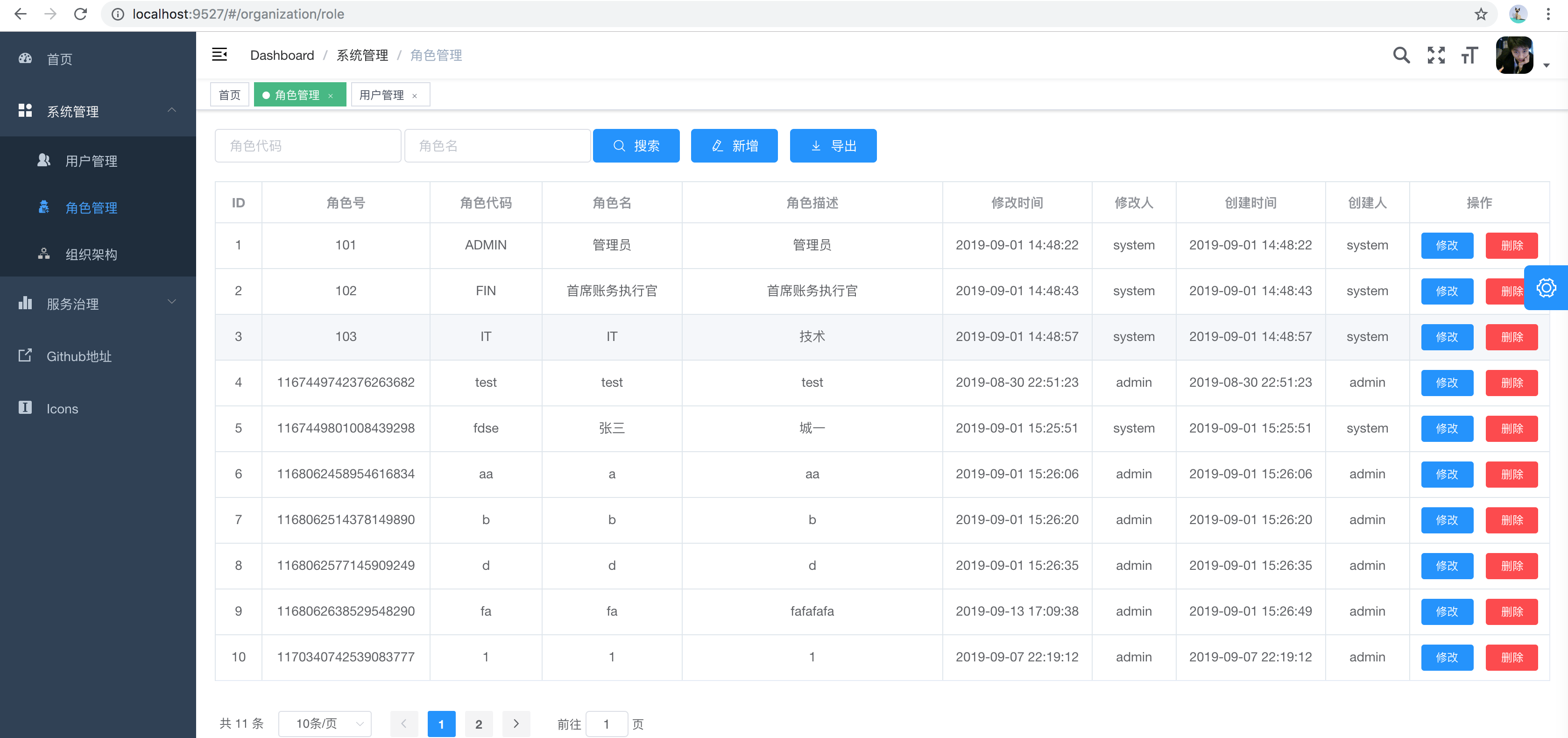
**角色管理**
|
|
|
|
|
|
|
|
|
**服务容错**
|
|
|

|
|
|
|
|
|
**API文档**
|
|
|

|
|
|
|
|
|
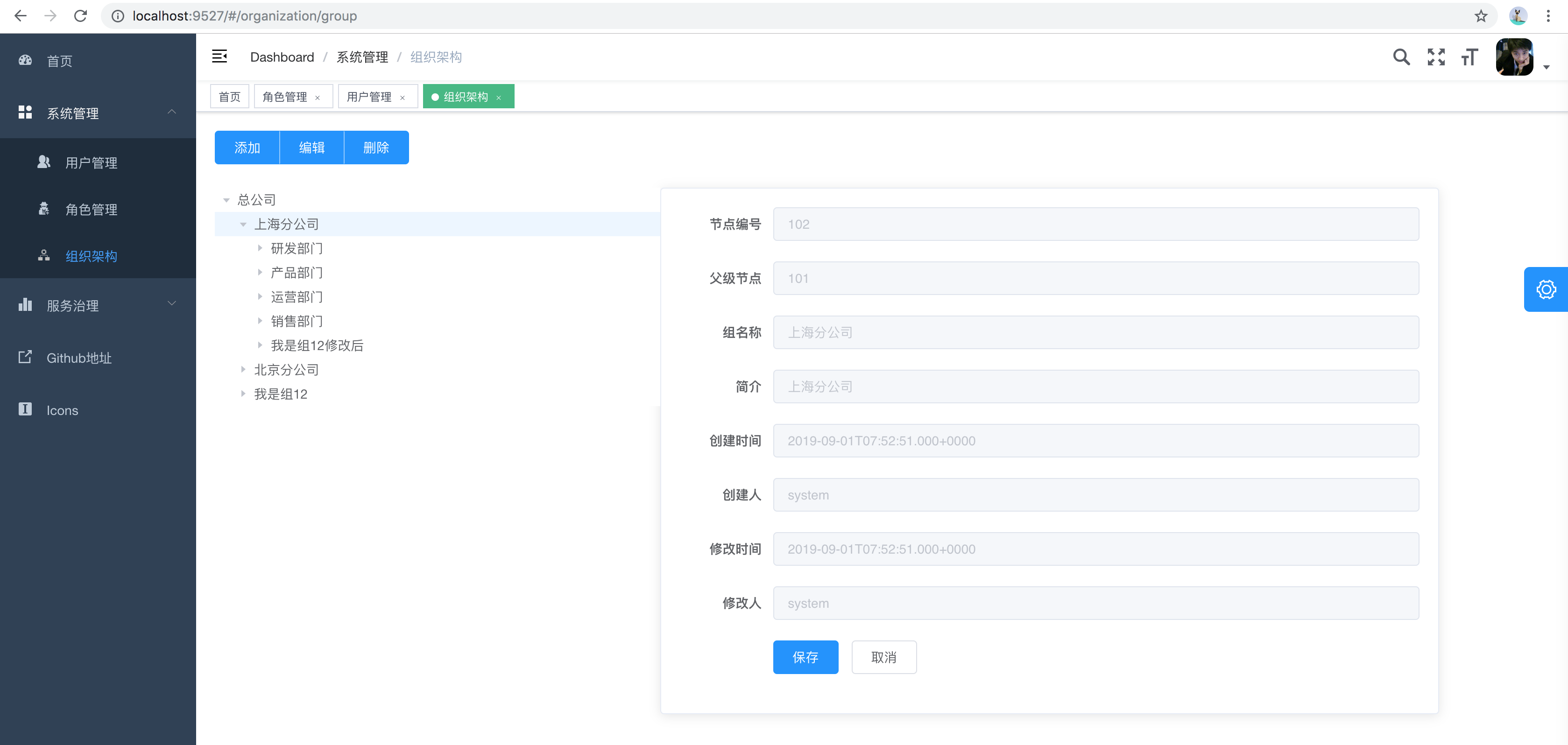
**组织架构管理**
|
|
|
|
|
|
|
|
|
### 基础服务
|
|
|
|
|
|
| 服务 | 使用技术 | 进度 | 备注 |
|
|
|
|----------|-------------------------|---------------|-----------|
|
|
|
| 注册中心 | Nacos | ✅ | |
|
|
|
| 配置中心 | Nacos | ✅ | |
|
|
|
| 消息总线 | SpringCloud Bus+Rabbitmq| ✅ | |
|
|
|
| 灰度分流 | OpenResty + lua | 🏗 | |
|
|
|
| 动态网关 | SpringCloud Gateway | ✅ | 多种维度的流量控制(服务、IP、用户等),后端可配置化🏗 |
|
|
|
| 授权认证 | Spring Security OAuth2 | ✅ | Jwt模式 |
|
|
|
| 服务容错 | SpringCloud Sentinel | ✅ | |
|
|
|
| 服务调用 | SpringCloud OpenFeign | ✅ | |
|
|
|
| 对象存储 | FastDFS/Minio | 🏗 | |
|
|
|
| 任务调度 | Elastic-Job | 🏗 | |
|
|
|
| 分库分表 | Mycat | 🏗 | |
|
|
|
| 数据权限 | | 🏗 | 使用mybatis对原查询做增强,业务代码不用控制,即可实现。 |
|
|
|
|
|
|
### 平台功能
|
|
|
|
|
|
| 服务 | 使用技术 | 进度 | 备注 |
|
|
|
|----------|-------------|---------------|-----------|
|
|
|
| 用户管理 | 自开发 | ✅ | 用户是系统操作者,该功能主要完成系统用户配置。 |
|
|
|
| 角色管理 | 自开发 | ✅ | 角色菜单权限分配、设置角色按机构进行数据范围权限划分。 |
|
|
|
| 菜单管理 | 自开发 | 🏗 | 配置系统菜单,操作权限,按钮权限标识等。 |
|
|
|
| 机构管理 | 自开发 | 🏗 | 配置系统组织机构,树结构展现,可随意调整上下级。 |
|
|
|
| 网关动态路由 | 自开发 | 🏗 | 网关动态路由管理 |
|
|
|
|
|
|
### 开发运维
|
|
|
|
|
|
| 服务 | 使用技术 | 进度 | 备注 |
|
|
|
|----------|-------------------------|---------------|-----------|
|
|
|
| 代码生成 | | 🏗 | 前后端代码的生成,支持Vue |
|
|
|
| 测试管理 | | 🏗 | |
|
|
|
| 文档管理 | Swagger2 | ✅ | |
|
|
|
| 服务监控 | Spring Boot Admin | ✅ | |
|
|
|
| 链路追踪 | SkyWalking | ✅ | |
|
|
|
| 操作审计 | | 🏗 | 系统关键操作日志记录和查询 |
|
|
|
| 日志管理 | ES + Kibana、Zipkin | ✅ | |
|
|
|
| 监控告警 | Grafana | ✅ | |
|
|
|
|
|
|
## 更新日志
|
|
|
|
|
|
**2019-10-18:**
|
|
|
|
|
|
1.使用nacos替代eureka为服务的注册中心
|
|
|
|
|
|
2.使用nacos替代apollo为服务的配置中心
|
|
|
|
|
|
3.引入使用sentinel替换掉hystrix,引入sentinel-dashboard
|
|
|
|
|
|
4.使用jetcache作两级缓存,优化缓存性能
|
|
|
|
|
|
5.网关启动时加载数据库中的路由到redis缓存
|
|
|
|
|
|
6.其它已知bug修复
|
|
|
|
|
|
## 联系交流
|
|
|
|
|
|
### 加入贡献代码
|
|
|
|
|
|
请入群 [请戳这里](https://github.com/zhoutaoo/SpringCloud/wiki) 加群主微信。
|
|
|
|
|
|
### 请作者喝饮料
|
|
|
|
|
|
如果你觉的有帮助到您,可以请作者喝饮料,这样更有动力,谢谢。
|
|
|
|
|
|
<p align="left">
|
|
|
<img width="300" src="https://user-images.githubusercontent.com/3946731/67401177-58eec300-f5e1-11e9-97e6-9ae29e3523e0.jpeg">
|
|
|
|
|
|
<img width="300" src="https://user-images.githubusercontent.com/3946731/67401198-60ae6780-f5e1-11e9-8c30-c12bd598011b.jpeg">
|
|
|
</p>
|
|
|
|
|
|
### 学习交流
|
|
|
|
|
|
EMail:zhoutaoo@foxmail.com
|
|
|
|
|
|
群1、2、3、4、5、6、7、8、9已满,请加群10,加群[请戳这里](https://github.com/zhoutaoo/SpringCloud/wiki)
|
|
|
|
|
|
此些群仅为技术交流群,请大家不要讨论政治、发广告等与技术无关的东西。大家如若有问题可以在群里直接发问,我会抽空答复。
|
|
|
|
|
|
请大家问问题时尽量描述清楚背景与问题关键信息,描述的越清楚越容易得到答案。也更容易判断问题可能点,节省判断的时间,而不用来回问答。
|
|
|
|
|
|
同时也鼓励群友们积极回复已知的问题,大家相互帮助共同成长。如有bug或新需求也可以直接提交issue到github,我会酌情处理。
|
|
|
|
|
|
如果你发现你的问题很久都没有人答复,那很有可能就是问题描述的不够清楚,别人无法回复。
|
|
|
|
|
|
**问问题的三要素**
|
|
|
|
|
|
1. 说明背景,使用了哪个模块,要做什么?
|
|
|
|
|
|
2. 怎么输入或操作的得到了什么结果? 截图,日志
|
|
|
|
|
|
3. 哪里不明白或有什么疑问 ?
|
|
|
|
|
|
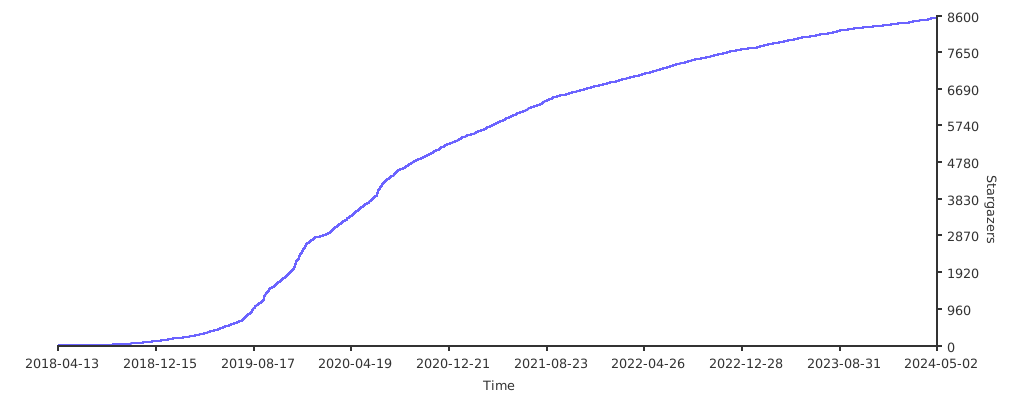
## Stargazers over time
|
|
|
|
|
|
[](https://starchart.cc/zhoutaoo/SpringCloud)
|